How Does Cloud Computing Work? A Practical Guide
A clear explanation of what cloud computing actually is: virtualisation, data centres, IaaS, PaaS and SaaS, the shared responsibility model and how cloud costs really work.
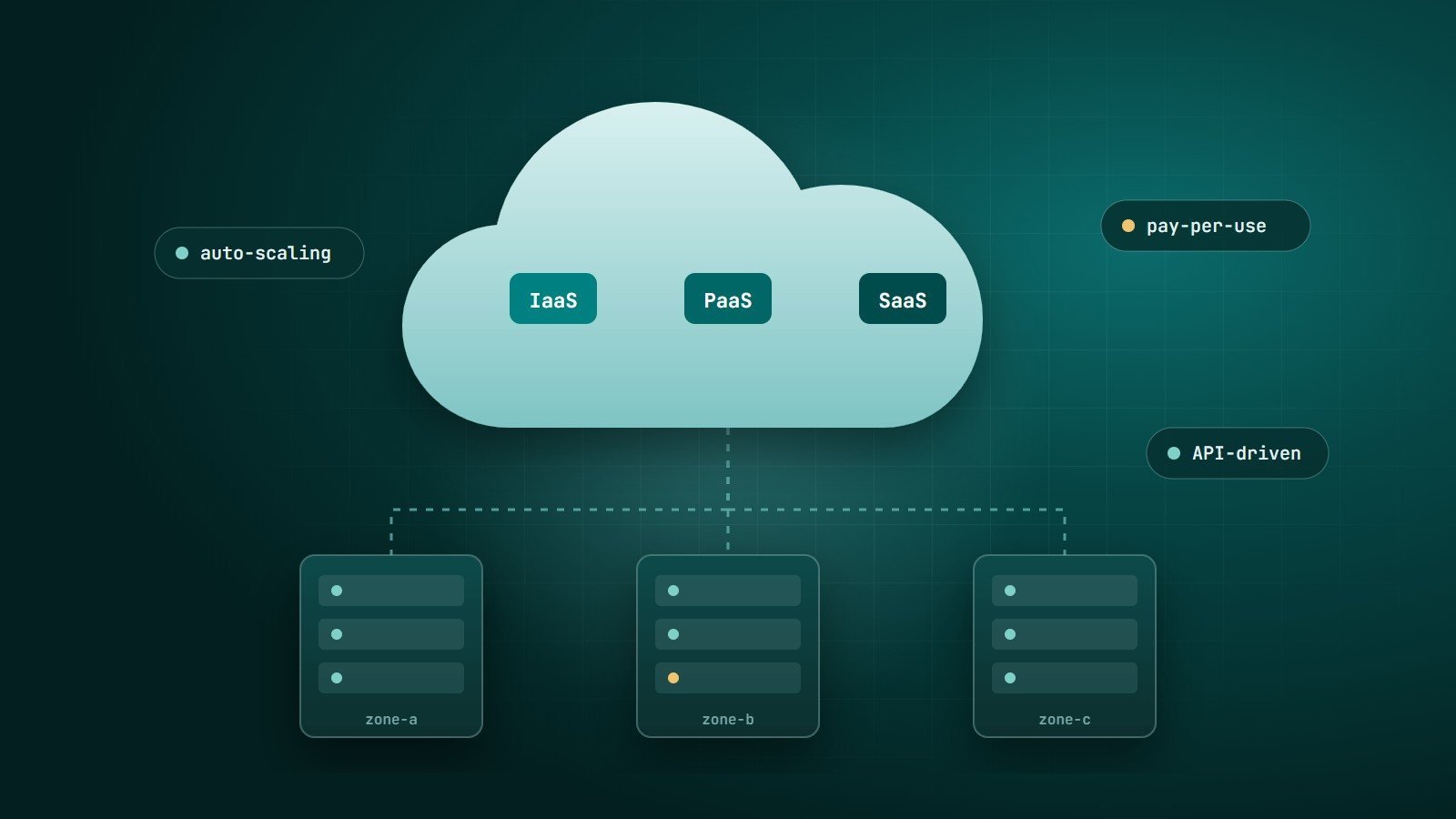
"The cloud" is simply computing resources — servers, storage, databases, networking and software — that you rent over the internet from a provider, instead of buying and running the hardware yourself. You request what you need, use it, and pay for what you use.
That definition is short, but it hides a lot of engineering. This guide explains what is happening underneath and what it means when you decide how to use the cloud.
What happens in a cloud data centre
Cloud providers operate large data centres filled with physical servers, storage systems and network equipment. They group data centres into regions (geographic locations) and, within a region, into separate availability zones with independent power and networking so that a failure in one does not take down the others.
Two technologies turn this hardware into something you can rent by the minute:
- Virtualisation. A hypervisor divides one physical server into many isolated virtual machines (VMs). Each VM behaves like its own computer, with its own operating system, even though it shares the underlying hardware.
- Automation through APIs. Everything — creating a server, attaching storage, opening a firewall port — is exposed through an API. The web console, command-line tools and infrastructure-as-code tools are all clients of that API. This is what makes resources available in minutes rather than weeks.
The essential characteristics
The widely used NIST definition of cloud computing lists five characteristics:
- On-demand self-service — you provision resources yourself, without waiting for someone at the provider.
- Broad network access — resources are available over the network from standard devices.
- Resource pooling — the provider serves many customers from shared infrastructure.
- Rapid elasticity — capacity can grow and shrink quickly, sometimes automatically.
- Measured service — usage is metered, which is what makes pay-as-you-go billing possible.
Service models: IaaS, PaaS and SaaS
The service models describe how much of the stack the provider manages for you.
| Model | You manage | The provider manages | Typical examples |
|---|---|---|---|
| IaaS — Infrastructure as a Service | Operating system, runtime, application, data | Physical hardware, networking, virtualisation | Virtual machines, block storage, virtual networks |
| PaaS — Platform as a Service | Application code and data | Everything up to the runtime, including OS patching and scaling infrastructure | Managed app platforms, managed databases |
| SaaS — Software as a Service | Your data and user settings | The entire application | Email, office suites, CRM tools |
Serverless functions and managed containers sit between IaaS and PaaS: you supply code or container images, and the platform handles servers and scaling.
Deployment models
- Public cloud: infrastructure shared by many customers and operated by a provider.
- Private cloud: cloud-style infrastructure dedicated to one organisation, on its own premises or hosted.
- Hybrid cloud: a combination, with workloads and data moving between environments.
- Multi-cloud: using services from more than one public cloud provider.
The shared responsibility model
Security in the cloud is shared. The provider is responsible for the security of the cloud — physical data centres, hardware and the virtualisation layer. You are responsible for security in the cloud — who has access, how your data is protected, how your network rules are set, and whether your operating systems and applications are patched.
The exact split depends on the service model: with IaaS you patch the operating system; with SaaS you mainly manage users, permissions and data. Many cloud security incidents come from customer-side misconfiguration, such as storage that was accidentally made public, rather than from failures of the provider.
How cloud pricing works
Most cloud services are billed on measured usage: compute time, storage per GB-month, requests, and data transferred out of the provider's network. A few practical consequences:
- Idle resources still cost money. A forgotten VM or oversized database bills every hour it runs.
- Data transfer adds up. Moving data out to the internet or between regions is often charged separately.
- Commitments reduce prices. Providers discount steady workloads in exchange for one- or three-year commitments.
- Visibility matters. Budgets, alerts and tagging resources by project make costs understandable before they become surprises.
When the cloud is a good fit — and when to think twice
The cloud is a strong fit when demand varies, when you need to experiment quickly, or when you want managed services instead of running databases and queues yourself. It deserves careful analysis for very steady, predictable workloads at large scale, for strict data-residency requirements, or when an application depends heavily on specialised hardware. In practice many organisations use a mix.
Key takeaways
- Cloud computing is rented, API-driven infrastructure built on virtualisation and large data centres.
- IaaS, PaaS and SaaS differ in how much of the stack you manage.
- Security is shared — misconfiguration on the customer side is a common risk.
- Pay-as-you-go pricing rewards active cost management.
How Wintecsys can help
Choosing between shared hosting, a VPS and a cloud platform — and setting it up securely — is where many projects lose time and money. We set up hosting, domains and SSL, plan cloud architecture and migrations, automate deployments and backups, and keep an eye on costs.
See our cloud, hosting and DevOps services or tell us about your project.