Git Branching Strategies: Git Flow vs GitHub Flow vs Trunk-Based Development
How your team uses Git branches shapes how fast and safely you can release. Here is a clear comparison of the three most common branching strategies.
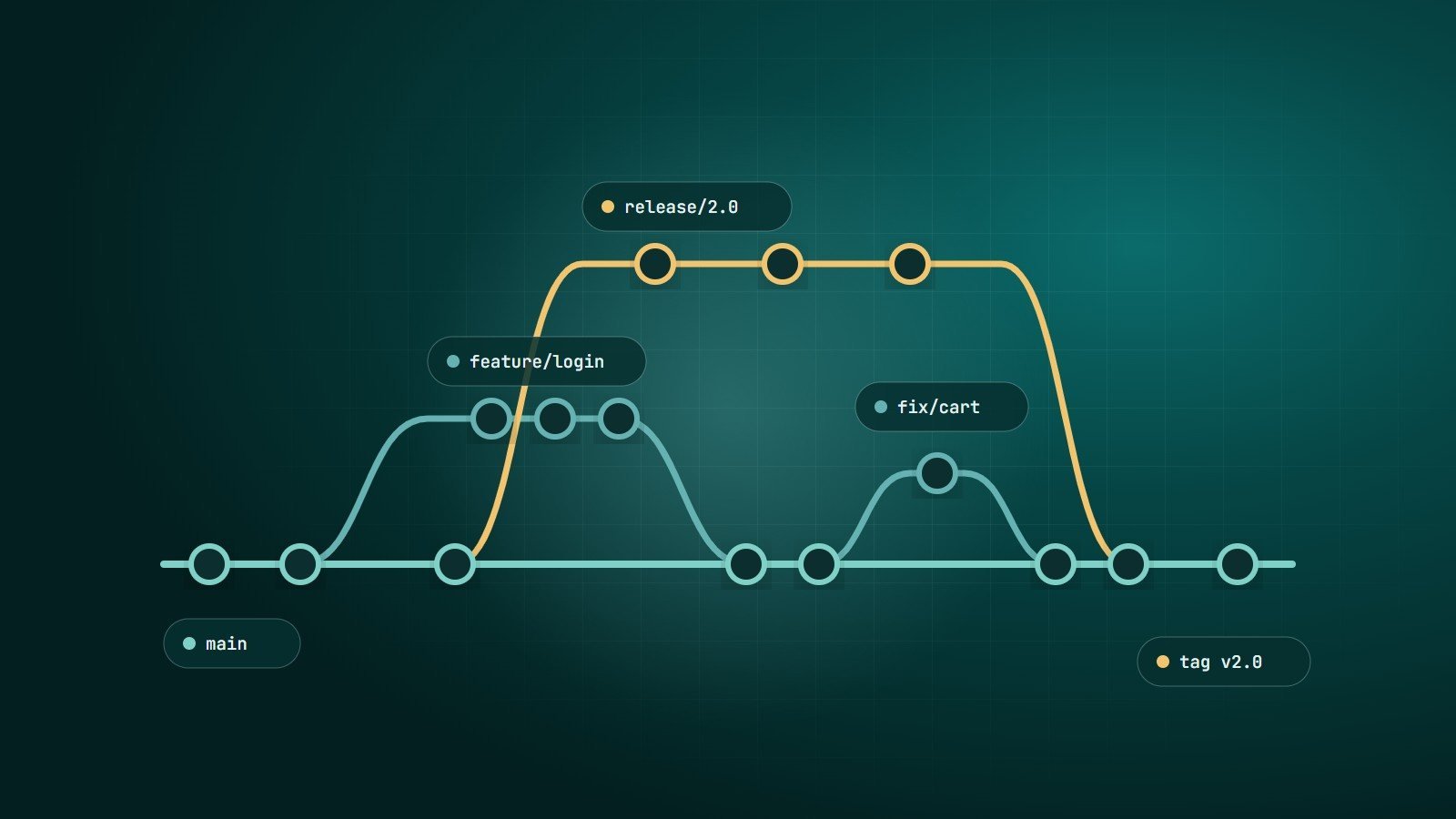
Git is the version control system used by most software teams. It makes branching cheap and easy — so the question is not whether to use branches, but how. A branching strategy is a team agreement about which branches exist, how long they live and how code reaches production.
1. Git Flow
Described by Vincent Driessen in 2010, Git Flow uses several long-lived and supporting branches:
main— always reflects released production code, with a tag for each release.develop— the integration branch for the next release.feature/*— branched from and merged back intodevelop.release/*— prepares a release: final fixes, version numbers.hotfix/*— urgent production fixes branched frommain.
Pros: clear structure for scheduled, versioned releases; supports maintaining several released versions.
Cons: many branches and merges; long-lived branches drift apart, causing painful merge conflicts; slows continuous delivery. Its author later added a note that simpler workflows suit teams doing continuous delivery of web applications.
Best for: software shipped in versions — installed desktop applications, libraries, mobile apps with formal release trains, or products where multiple versions are supported at once.
2. GitHub Flow
A deliberately simple model:
mainis always deployable.- Create a short-lived branch for each change.
- Open a pull request; automated tests run; teammates review.
- Merge into
mainand deploy.
Pros: easy to learn; fits continuous delivery; review happens on every change.
Cons: needs good automated tests and a reliable deployment process; less suited to supporting multiple released versions.
Best for: web applications and SaaS products deployed frequently by small and medium teams.
3. Trunk-Based Development
Developers integrate into a single branch — the "trunk", usually main — at least daily, either by committing directly or through very short-lived branches that last hours rather than days. Unfinished features are hidden behind feature flags instead of living on long branches.
Pros: minimal merge conflicts; true continuous integration; fast feedback. The DORA research programme has identified trunk-based development as one of the capabilities associated with high software delivery performance.
Cons: requires discipline, strong automated testing, fast CI and feature flag practices.
Best for: experienced teams practising CI/CD and frequent releases.
Comparison
| Git Flow | GitHub Flow | Trunk-Based | |
|---|---|---|---|
| Long-lived branches | main + develop | main only | main only |
| Branch lifetime | Days to weeks | Hours to days | Hours (or none) |
| Release style | Scheduled versions | Continuous | Continuous |
| Complexity | High | Low | Low process, high discipline |
| Needs feature flags | No | Sometimes | Yes |
Good practices for any strategy
- Keep branches short-lived — the longer a branch lives, the harder the merge.
- Small pull requests — easier to review thoroughly and safer to deploy.
- Protect the main branch — require passing CI and at least one review before merging.
- Automate checks with CI — see what is CI/CD.
- Write clear commit messages explaining why, not only what. Conventions such as Conventional Commits help automate changelogs.
- Tag releases so you always know exactly what is running in production.
- Never commit secrets; use secret scanning to catch mistakes.
How to choose
- Shipping a web app continuously with a small team? Start with GitHub Flow.
- Strong test automation and a desire to release many times a day? Move toward trunk-based development.
- Shipping numbered versions and supporting several of them? Git Flow or a release-branch model fits.
Key takeaways
- Git Flow suits versioned releases; GitHub Flow and trunk-based development suit continuous delivery.
- Short-lived branches, small pull requests and automated checks matter more than the specific model.
- Pick the simplest strategy that fits how you release.
How Wintecsys can help
We work with clean Git workflows, code review and automated pipelines on every project — and help in-house teams set up the same practices.
See our cloud & DevOps services or improve your workflow with us.